See what actually fits in your week.

Weekline is a weekly planner for iPhone and iPad. You give each task a size and decide how much a day can hold. When a day is full, Weekline draws a red line.

Download on the App Store

For iPhone and iPad. Your first 30 tasks are free. After that, unlock Weekline Pro once. No subscription, no account.

  • No account
  • Works offline
  • Optional iCloud Sync
  • No subscription
  • 4Sort tax documents
  • 6Clear out the garage
  • 2Back up photos

Anything below the line won’t fit today. You decide where it goes.

How it works

One week, Monday to Sunday.

Scroll through a sample week. The board is modeled on Weekline’s iPad view, with the same sizes and the same line.

  1. MON

    On Monday, the week looks empty.

    Seven columns, room everywhere. On a list, every task looks the same size.

  2. TUE

    Every task gets a size.

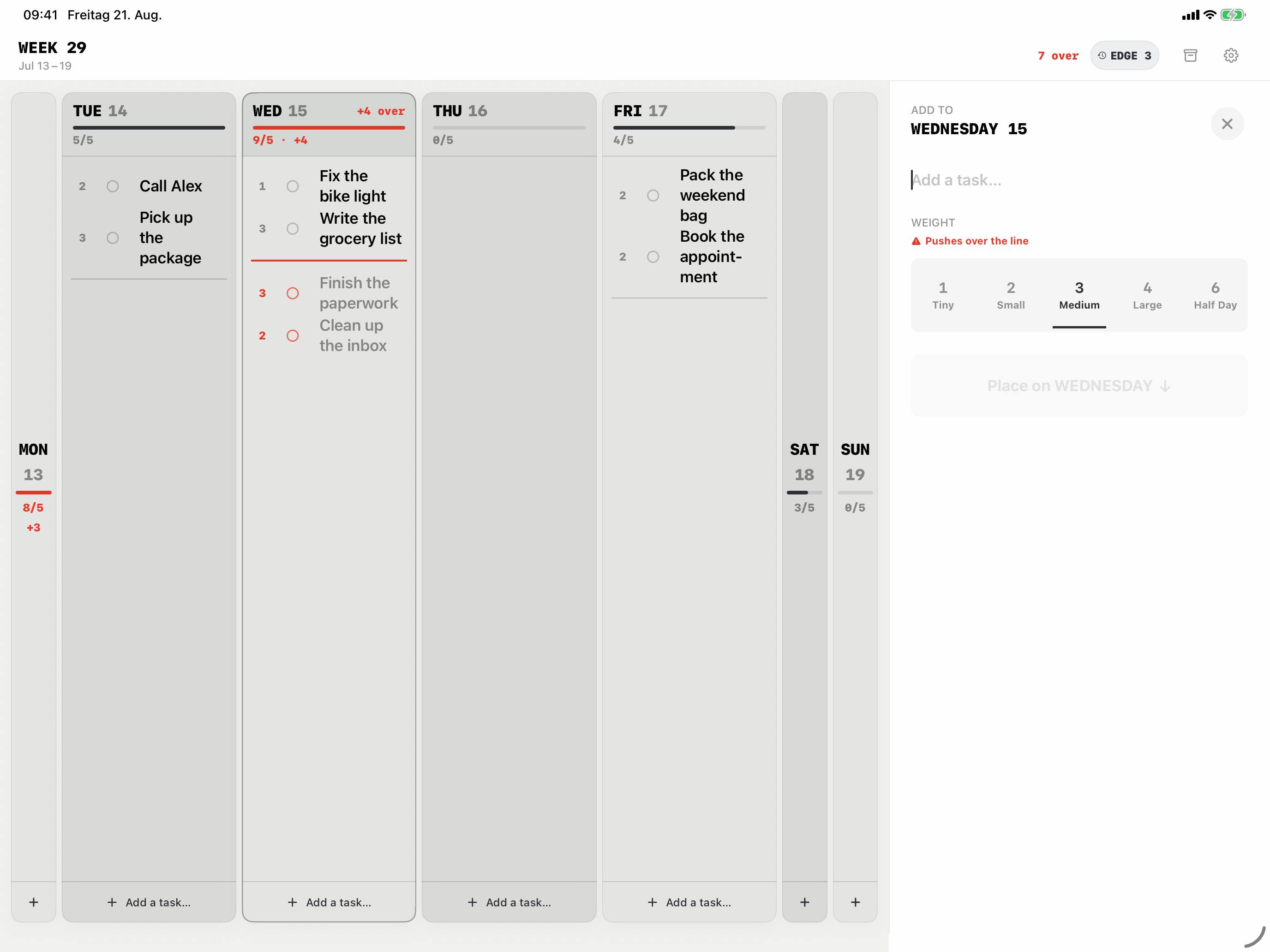
    Tiny (1), Small (2), Medium (3), Large (4) or Half Day (6). A phone call takes minutes; a presentation doesn’t.

  3. WED

    Then it gets tight. Too much.

    You set how much a day can hold – 5 here. Anything beyond that drops below the red line and turns grey. The header shows how far over the day is.

  4. THU

    Move it instead of pushing through.

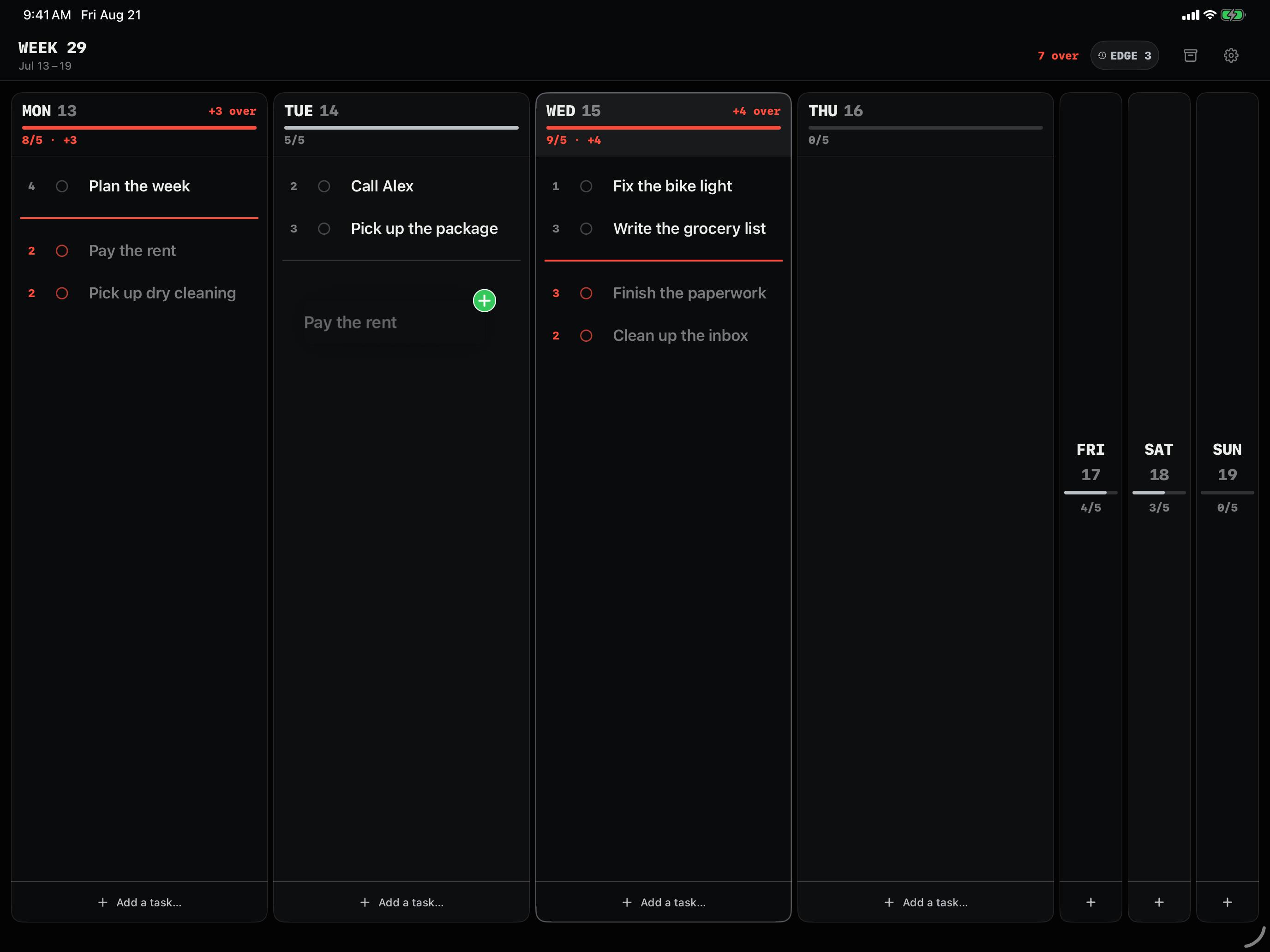
    Drag a task to a day with room. The line moves with it and the number at the top goes down.

  5. SUN

    What’s left waits at the Week Edge.

    When a new week starts, Weekline either carries open tasks over or collects them at the Week Edge – your choice in Settings. From there you schedule them again or drop them.

Number before a task: its size. Under each day: used / capacity.

Try it

How full is your Wednesday?

Set how much a day can hold for you, then add tasks. The math works just like in the app.

WEDNESDAY0/5
    THURSDAY0/5

      Drag with a mouse or your finger. With a keyboard: select a task and move it with the arrow keys.

      Screenshots from the app

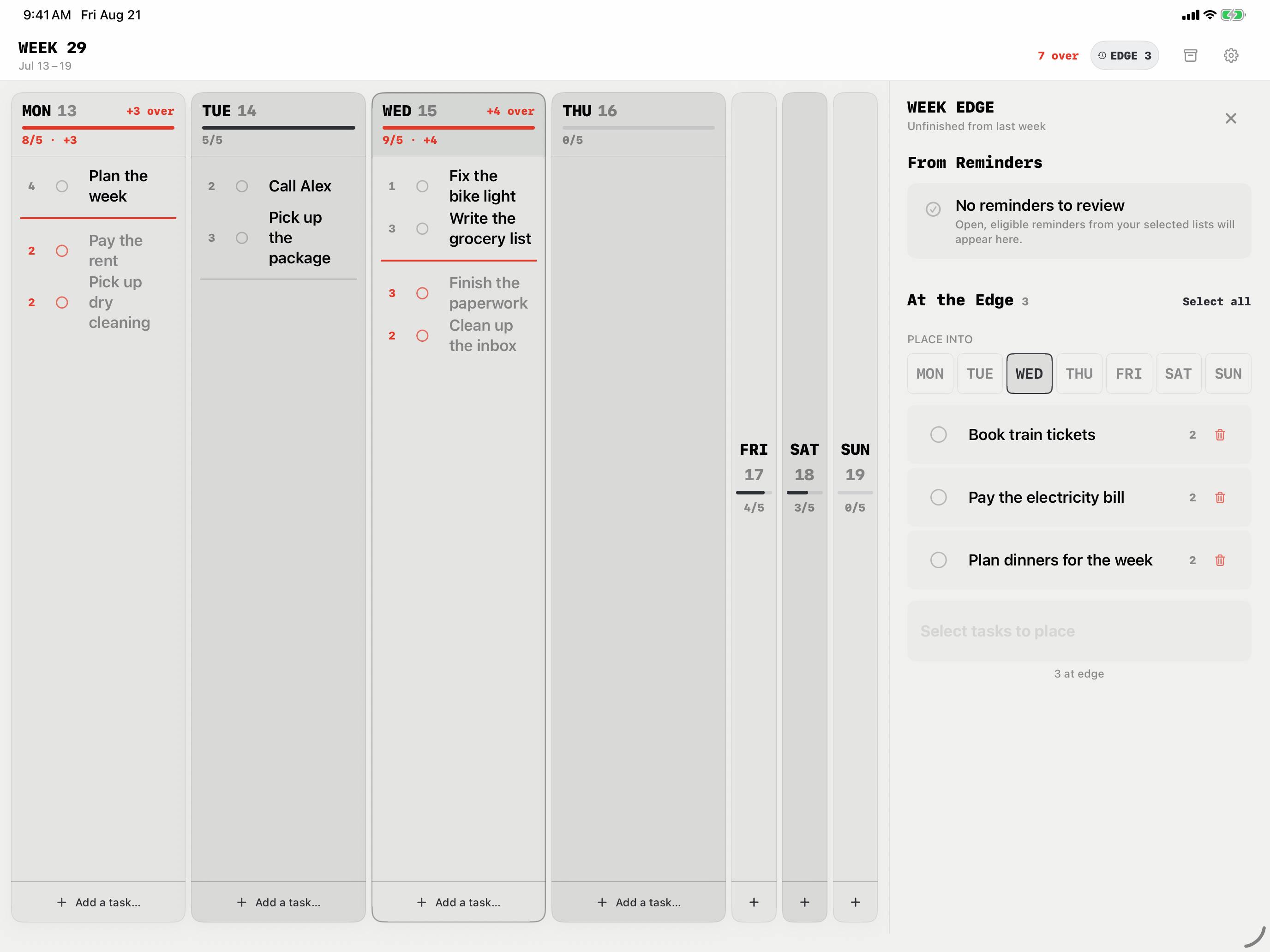
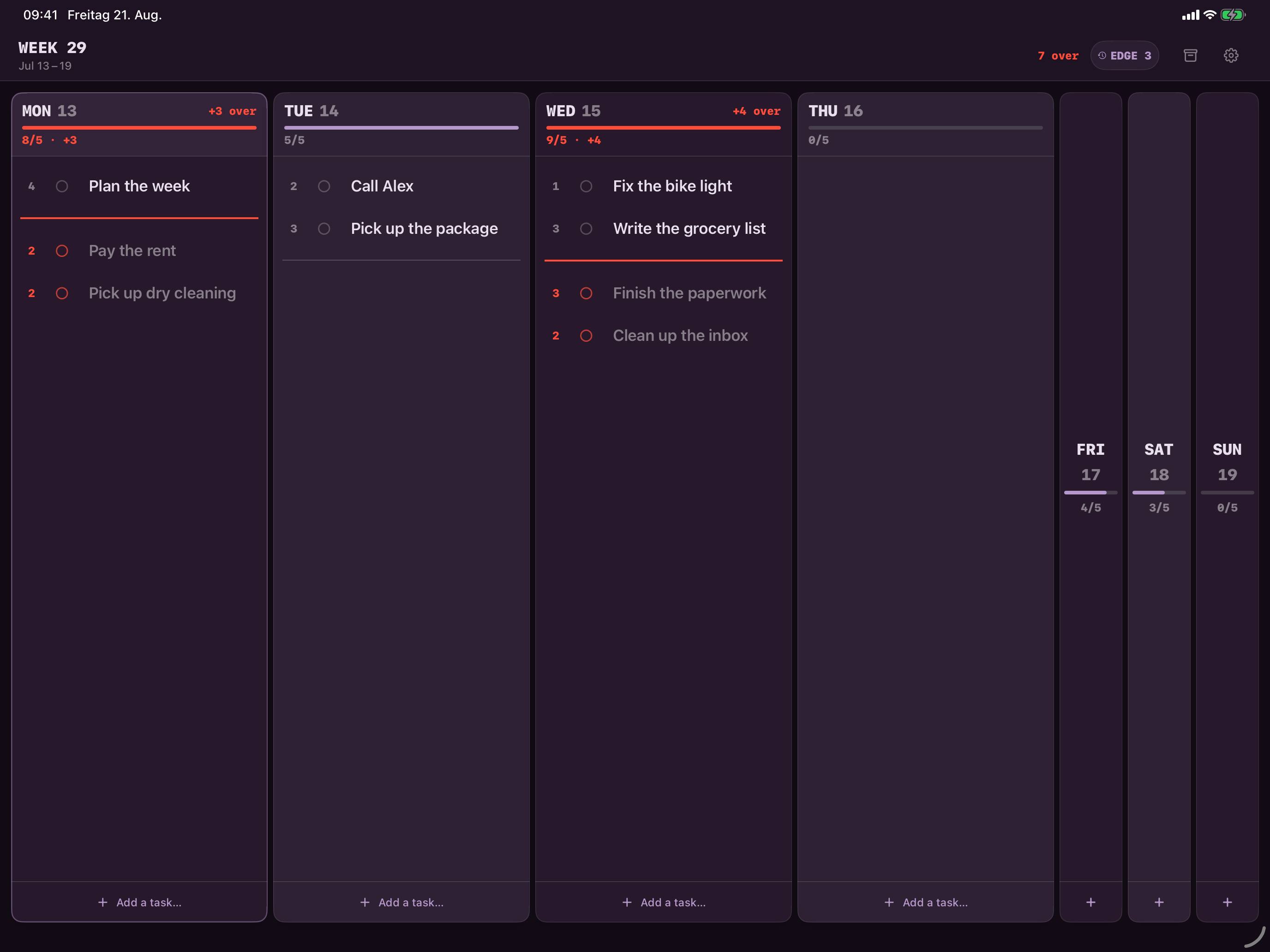
      On iPad, you see the whole week.

      Since version 1.5.2, Weekline runs on iPhone and iPad. On iPad, all seven days sit side by side. These are unedited screenshots. More about Weekline on iPad

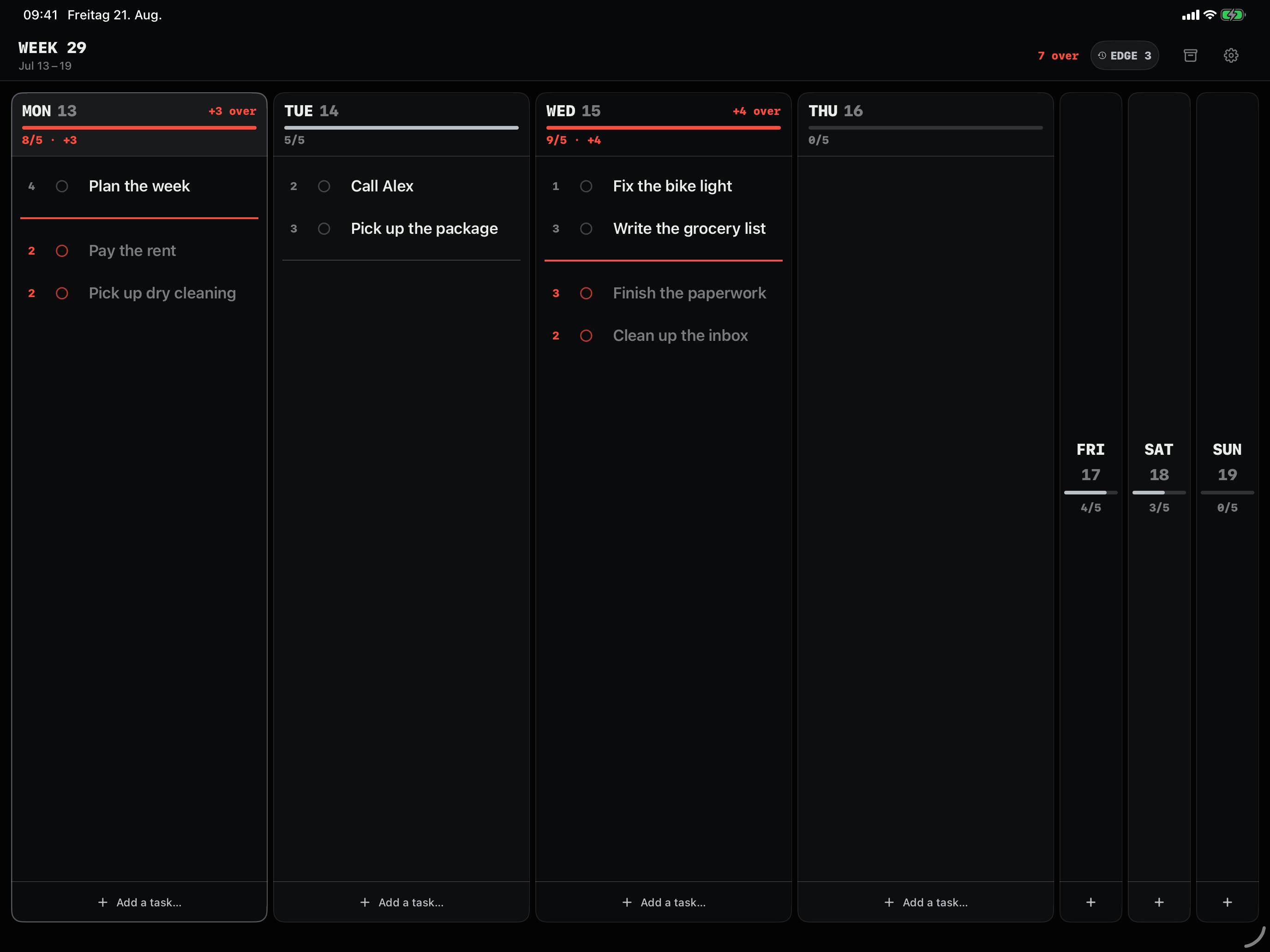
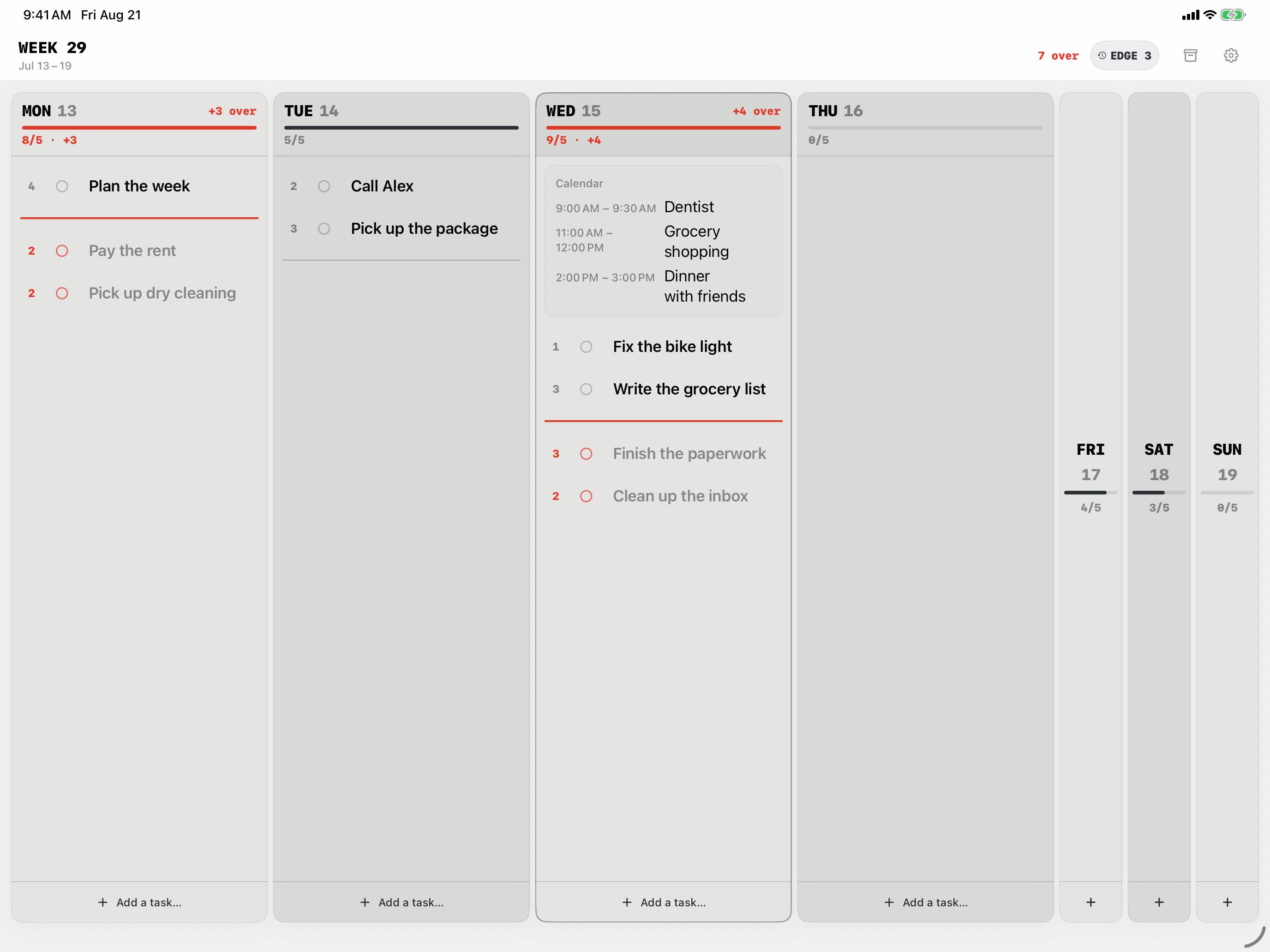
      Weekline on iPad: Monday and Wednesday are overbooked. What no longer fits sits below the red line. Weekline on iPad: Events from your calendar appear inside the day for reference. Weekline never edits them. Weekline on iPad: A task gets dragged to Tuesday, and Monday has room again. Weekline on iPad: You pick a size when you add a task, and see before saving whether it pushes the day over the line. Weekline on iPad: Open tasks and selected Apple Reminders wait at the Week Edge until you give them a day. Weekline on iPad: Light, Dark or System. Weekline Pro adds more color palettes.

      Monday and Wednesday are overbooked. What no longer fits sits below the red line.

      What else is in there

      Weekline plans one week at a time. It pulls in the calendar and reminders you already use.

      • Calendar events

        Selected calendars show up in your days so you can plan around fixed appointments. Weekline only reads them and doesn’t count them against your capacity.

        Calendar
      • Apple Reminders

        Pick Reminder lists, then bring individual reminders into your week from the Week Edge. Once the Weekline task exists, the reminder is checked off.

        Reminders
      • Daily Carry

        Yesterday’s leftovers can be reviewed first or moved straight to today – with today’s load in view.

        Every day
      • Week Recap and Archive

        When a new week starts, you see what was planned and what got done. Finished tasks go to the archive. No streaks, no scores.

        Every week
      • Widgets

        Free: the small “Today Line” widget and the Lock Screen widgets. With Weekline Pro: Week Overview, Overload Radar and Today Tasks, where you can check off and add tasks.

        iPhone & iPad
      • iCloud Sync

        If you want, Weekline keeps iPhone and iPad in sync through your private iCloud storage. Without Sync, everything stays on the device.

        Optional
      • Backups

        Export a backup file whenever you like and restore it later.

        Local

      From App Store reviews

      “so simple and straightforward without all the unnecessary bells and whistles.”
      App Store review, United States, June 2026
      “Super simple and easy to use! Ready to go.”
      App Store review, United States, June 2026
      „Endlich eine einfache wunderschöne übersichtliche Woche mit der Anzeige wenn zu viele todos an einem Tag geplant sind.“
      App Store review, Germany, July 2026 – “Finally a simple, beautiful week view that warns you when one day has too many to-dos.”

      In the press

      Your plans stay on your device.

      Weekline stores your planning locally. If you turn on iCloud Sync, the data it needs is also kept in your private iCloud storage (Apple CloudKit) and synced between your devices. Weekline doesn’t analyze your plans.

      No Weekline account

      You don’t need an account with Weekline. The app works offline.

      iCloud Sync through Apple

      If you turn on Sync, your data goes through Apple’s CloudKit into your own iCloud storage.

      This website

      No analytics, no ad trackers, no cookies, no third-party fonts. If you dismiss the language hint, only your browser remembers that.

      Full privacy policy

      Start free. Unlock once.

      No subscription, no account. The App Store shows the Weekline Pro price in your currency. Why no subscription?

      Free

      Your first 30 tasks, with the capacity line, task sizes, Week Edge, calendar events, and the Today Line and Lock Screen widgets. Deleted or completed tasks still count.

      Weekline Pro, one-time purchase

      Unlimited tasks, all Pro color palettes and the remaining Home Screen widgets. You pay once.

      Questions

      Is Weekline free?

      Your first 30 tasks are free, with every planning feature. After that, you unlock Weekline Pro once as an in-app purchase. There’s no subscription.

      Is there an iPad version?

      Yes. Since version 1.5.2, Weekline is a Universal app for iPhone and iPad. On iPad you see all seven days side by side.

      Do I plan in hours?

      No. Each task has a size from 1 to 6, and you set one daily capacity: Light (3), Normal (5), Heavy (7) or a custom value from 1 to 12. It applies to every day.

      Does Weekline change my calendar?

      No. Events are only displayed. Weekline doesn’t edit them, doesn’t store them as its own data and doesn’t count them against your capacity.

      Do I need an account?

      No. Your plans live on your device. iCloud Sync is optional and uses your own Apple ID.

      Is Weekline available for Android?

      Not yet. If you’re interested, join the Android waitlist – it shows me how much demand there is.

      Plan a week that actually fits.

      Download on the App Store

      For iPhone and iPad. Your first 30 tasks are free. After that, unlock Weekline Pro once. No subscription, no account.

      Weekline for Android?

      There’s no Android version yet. If you’d use one, leave your email address. It tells me whether it’s worth building.

      Used only to share meaningful updates about Weekline for Android.

      Questions, bugs or feedback?

      Send me an email. I build Weekline on my own and read every message myself.

      chrishq.dev+weekline@gmail.com

      Support page with answers